PhonePad 5 will not function without the PhonePad 5 Server service running. It is normally installed by default so you should not need to install it.
Select PhonePad Server to manage the PhonePad Server service.
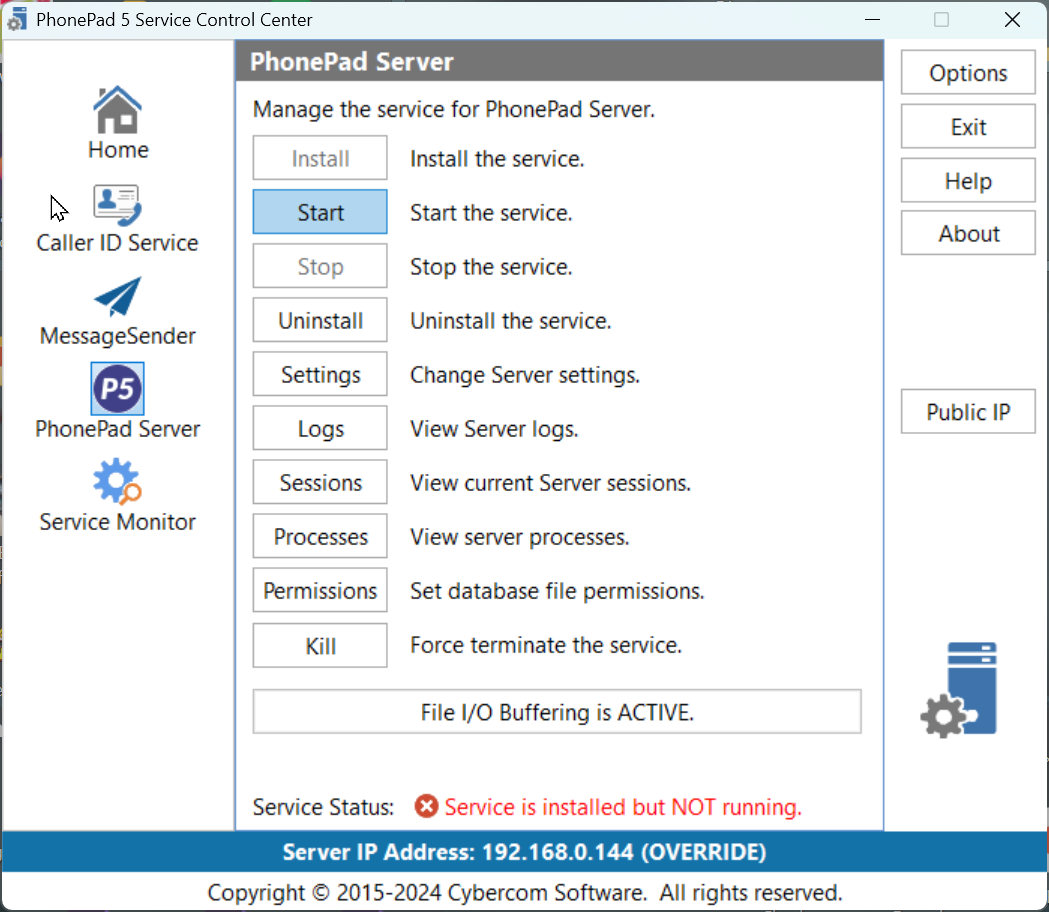
Install |
Installs the Server service. |
Start |
Starts the Server service. |
Stop |
Stops the Server service. |
Uninstall |
Uninstalls the Server service. |
Settings |
Opens the Server Settings window. |
Logs |
Opens the Log Viewer and displays the Server logs. |
Sessions |
Displays all current user sessions connected to the Server. |
Processes |
Opens the Process Monitor application. Use this to make sure the Server is listening on all required ports. |
Permissions |
This can be used to set the correct permissions for the PhonePad Server folders to avoid access rights errors. |
Kill |
Sometimes when a Windows service is stopped it can go into a state of limbo. It's neither stopped nor started. When it's in this state it won't respond to any commands. If this happens with the PhonePad Server service, click the Kill button to terminate it. The service then try to restart itself, but if it doesn't click on the Start button. |
File I/O Buffering is ACTIVE |
|
If you get an Access Denied error when trying to install or start the service, close the Control Center. Find the ControlCenter application in the folder you installed the server in, right-click on it, and then select Run as Administrator. |
