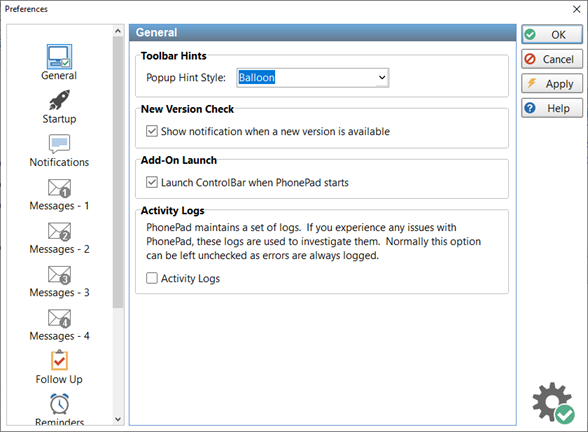
This setting affects the appearance of the popup hints displayed when you hover the mouse over toolbar buttons.
New Version Check
Show notification when a new version is available
Displays a popup message when a new version of PhonePad 5 is available for download. This option only appears for administrators.
Add-On Launch
Launch Control Bar When PhonePad Starts
When checked, the Control Bar will start when PhonePad starts.
Launch ToDo List When PhonePad Starts
When checked, the ToDo List will start when PhonePad starts.
Activity Logs
Activity Logs
When checked, PhonePad will log lots of different processes. To improve system performance this is normally left unchecked. However, it may need to be checked for support purposes.
Errors are always logged regardless of this setting.
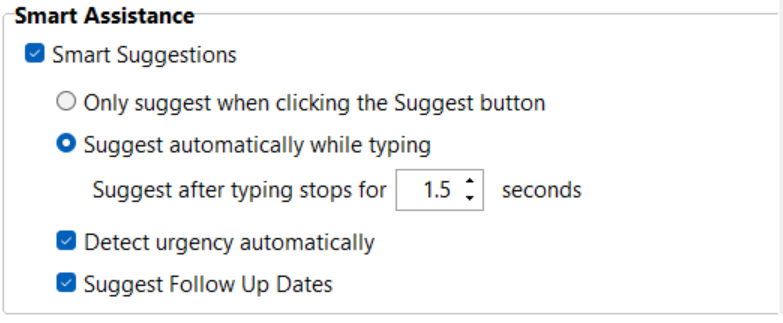
Smart Assistance
Smart Suggestions
When enabled, Smart Suggestions will be active.
Only suggest when clicking the Suggest button
When selected, suggestions are invoked when the Suggest button it clicked.
Suggestion automatically while typing
When selected, suggestions will be done automatically. No need to click the Suggest button.
Suggest after typing stops for x seconds
Determines how long to wait before automatically making suggestions.
Suggest Follow Up Dates
Attempts to calculate when a follow update date should be set.