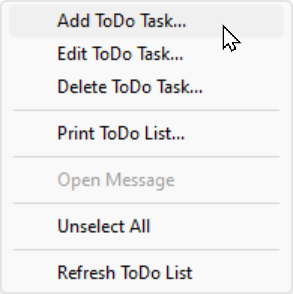
Right-click on the ToDo task list to display a popup menu:
Control |
Description |
Add ToDo Task |
Indicates whether or not the To Do task has been completed. Tasks can be marked as completed by clicking on this column. |
Edit ToDo Task |
Edit the selected ToDo task. This is the same as clicking the Edit button. |
Delete ToDo Task |
Delete the selected ToDo task. This is the same as clicking the Delete button. |
Print ToDo List |
Prints a copy of the ToDo List. |
Open Message |
If the selected ToDo Task is linked to a message in PhonePad, this will open the message. |
Unselect All |
Unselects any selected task in the task list. |
Refresh ToDo List |
Updates the ToDo List with any changes. This happens automatically but you can force a refresh using this option. |