Control |
Description |
||
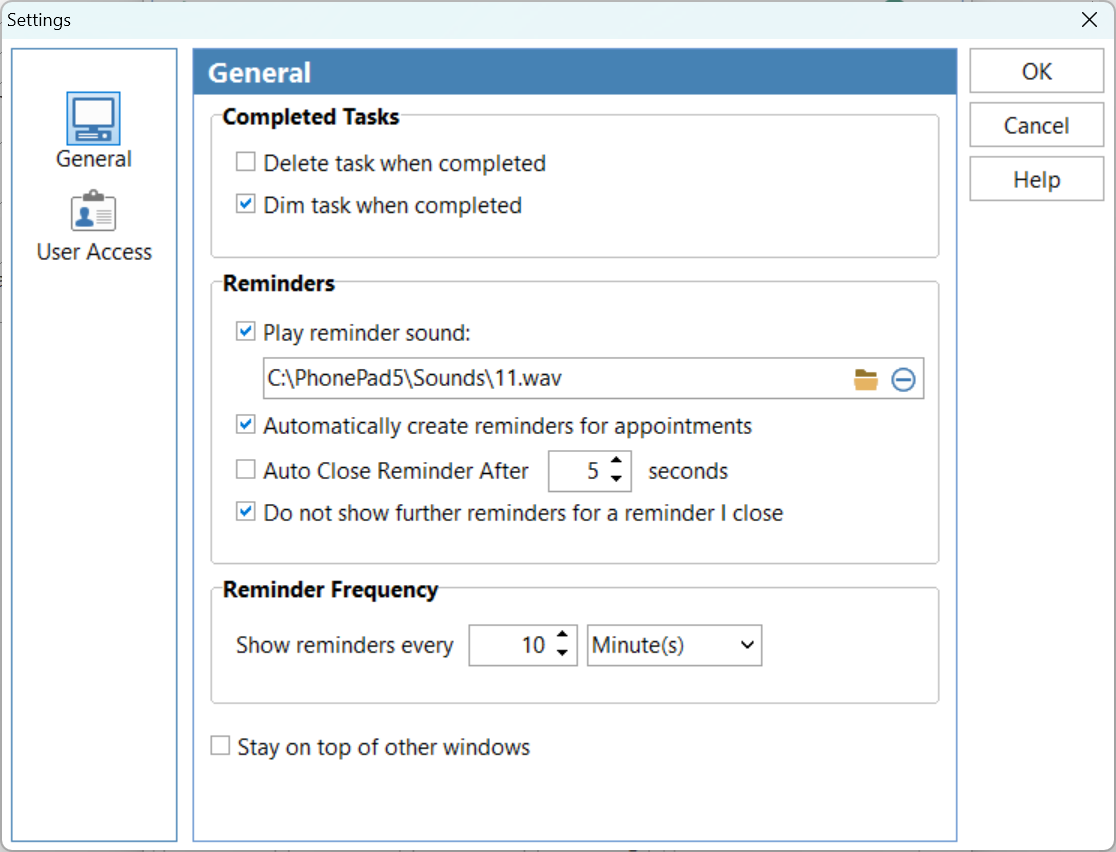
Delete Task When Completed |
When checked, any task that is completed will be automatically deleted. If the task is linked to a corresponding message in PhonePad, when the message is marked as completed in PhonePad the task will be deleted from the ToDo List (however, the message will not be deleted from PhonePad). |
||
|
When checked, completed tasks will be display in a light gray color. |
||
Play Reminder Sound |
When checked, the specified reminder sound will be played when a reminder is due. |
||
Reminder Sound |
Allows you to select a reminder sound (wav files only). A number of sound files are included with PhonePad. |
||
Automatically Create Reminders for Appointments |
When checked, a reminder will be automatically created when you drag and drop an Appointment Calendar appointment to the To Do List. |
||
Auto Close Reminder After x Seconds |
When checked, reminders will close themselves after the specified number of seconds. |
||
Do Not Show Further Reminders for a Reminder I Close |
When checked, when a reminder is closed it won't be shown again. |
||
Show Reminders Every x Minutes |
When checked, reminders will be shown at the interval specified. |
||
Stay on Top of Other Windows |
When checked, ToDo List will stay on top of other windows. Important: If other windows or applications use the same setting then To Do List may not appear on top. |
Click OK to save your settings.