These settings are used by the Service Monitor service to manage some of the other PhonePad services. They can be used to automatically restart the services at a set time each day, or to restart the services when Service Monitor detects that they are no longer responding.
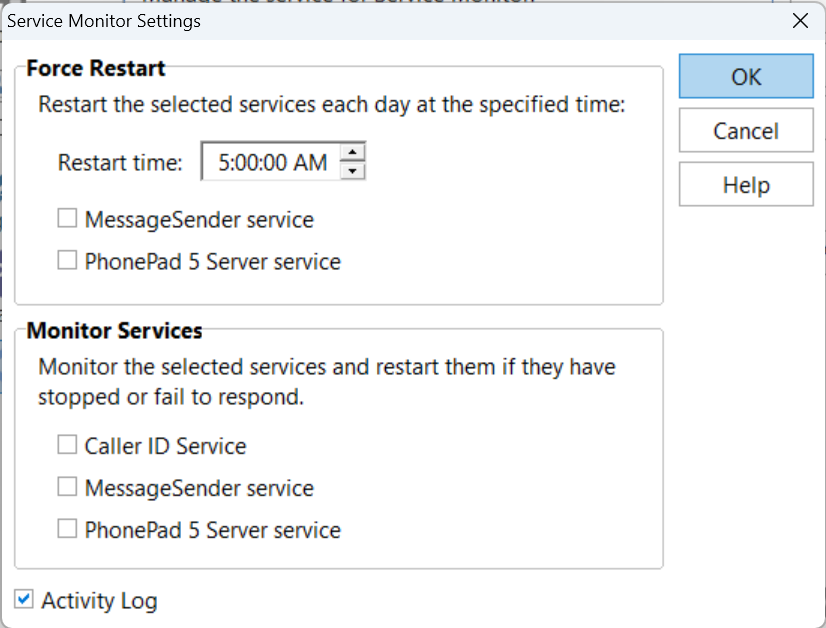
It shouldn't be necessary to use these settings at all unless there is some unknown process on the Server or Host PC conflicting with one or more PhonePad services.
Force Restart |
|
Restart Time |
Set the time the services should be restarted. |
MessageSender Service |
When checked, the MessageSender service will be restarted at the set time. |
PhonePad 5 Server Service |
When checked, the PhonePad Server service will be restarted at the set time. |
Monitor Services |
|
Caller ID Service |
When checked, the Caller ID service will be automatically restarted if it stops responding. |
MessageSender Service |
When checked, the MessageSender service will be automatically restarted if it stops responding. |
PhonePad 5 Server Service |
When checked, the PhonePad Server service will be automatically restarted if it stops responding. |