The default settings shown here should always be used unless you have a specific reason for not doing so.
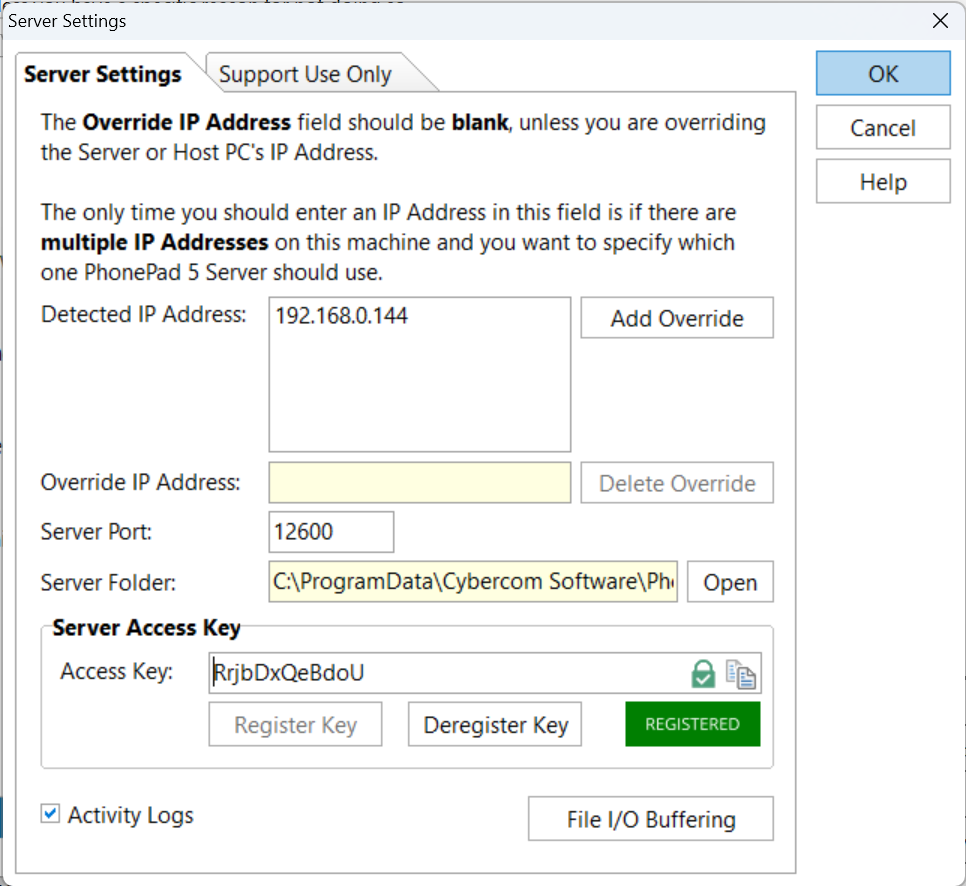
Detected IP Address |
ControlCenter will attempt to detect the active IP Address of the host machine and display it in this field. |
Override IP Address |
This should be left blank unless your Server or Host PC has multiple IP Addresses and you need to specify which IP Address to use. It's possible that the Detected IP Address is not the active address. |
Delete Override |
Removes any IP Address from the Server IP Address field. You can also clear the field out yourself. Remember to click OK to save this change. |
Server Port |
The main data connection port for PhonePad. Do not change this unless there is a conflict with another process using the same port. |
Server Folder |
Shows the location of the PhonePad 5 Data Folder. This setting cannot be edited. |
Server Access Key |
Provides an alternative way for PhonePad to connect to the Server.
Click the Lock button to generate a unique Access Key. Click Register Key to register it with our Servers. The Access Key is used in the Workstation Config program.
|
Activity Logs |
When checked, the service logs it processes and any errors it may encounter. It's recommended you have this checked. |
File I/O Buffering |
Click this button to access File I/O Buffering, which can give PhonePad a performance boost. |