Each user has their own settings in Appointment Calendar.
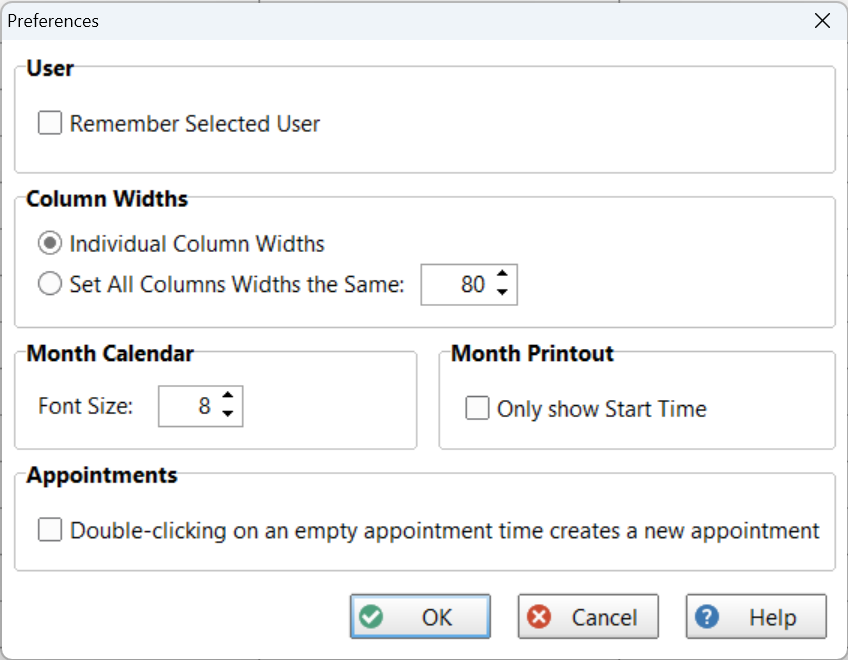
Select Preferences from the File menu.
User |
|
Remember Selected User |
When checked, Appointment Calendar will remember which users are selected between sessions. This saves you from having to select them each time.
|
Column Widths |
|
Individual Column Widths
|
When selected, you can set the width of each column in the Day and Week views independently.
|
Set All Columns Widths the Same
|
When selected, all column widths in the Day and Week views will be the size specified. |
Month Calendar |
|
Font Size |
Sets the size of the font used for listed appointments in the Month view.
|
Month Printout |
|
Only Show Start Time |
When checked, the month printout won't show the End Time, saving on space. |
Appointments |
|
Double-clicking on empty appointment time creates a new Standard Appointment
|
When checked, you can create a new Standard Appointment by double-clicking in an empty time slot. When unchecked, it will open the appointment in edit mode.
|
Keep appointment details selected on single click |
When checked, clicking on an appointment will pin the information in the Appointment Details panel when the mouse cursor moves away from the appointment. Normally, the Appointment Details would be cleared. This option allows you to continue to view the Appointment Details even when the mouse is over a different time slot.
To unpin the Appointment Details, simply click on the same appointment or anywhere else in the grid.
When Appointment Details are pinned, a small cursor icon will be displayed in the status bar.
|
